
How to Track Customer Deposits and Progress Payments in QuickBooks Online
How to Track Customer Deposits and Progress Payments in QuickBooks Online
A customer agrees to a $30,000 project. You collect money before work begins, send another invoice when the first phase is complete, collect another payment halfway through, and bill the remaining amount when the project is finished.
Operationally, that sounds straightforward.
In QuickBooks Online, however, the workflow can become messy if the deposit, invoices, payments, bank deposits, and project activity are recorded independently instead of being treated as parts of the same billing process.
That can leave a business owner asking basic questions that should be easy to answer:
How much has the customer actually paid?
How much have we invoiced?
How much is still outstanding?
Was the bank deposit already recorded?
Does this payment belong to this project?
Are we looking at cash collected or project profitability?
The objective is not simply to enter each payment into QuickBooks. It is to create a consistent path from the original agreement through the final payment so the customer balance, bank activity, and project reporting remain understandable.
What Is a Customer Deposit?
A customer deposit is money received from a customer before some or all of the related work has been completed.
For example, a contractor may require a 20% deposit before scheduling a project. An agency may require an upfront amount before beginning an engagement. A custom manufacturer may collect money before production starts.
The deposit helps establish the commercial commitment, but receiving cash and completing the underlying work are separate events.
That distinction matters in bookkeeping.
Intuit provides a specific workflow for recording retainers and deposits received before services are performed. Depending on the business and circumstances, the appropriate accounting treatment may require input from the business’s accountant or outside tax professional.
For bookkeeping purposes, the key is consistency. The deposit should be connected to the correct customer and handled in a way that allows it to be properly incorporated into the later billing process.
What Is a Progress Payment?
A progress payment is a partial payment made as a project advances rather than waiting until the entire project is complete.
In everyday business conversations, you may also hear terms such as milestone payment, partial payment, or installment payment. They are related, but they do not always mean exactly the same thing.
A milestone payment is typically tied to completion of a specific stage of work.
A partial payment simply means that only part of an amount due is being paid.
An installment payment usually refers to one payment in a predetermined payment schedule.
A progress payment is the broader project-billing concept of collecting amounts as work progresses.
QuickBooks Online’s progress invoicing functionality is designed around this idea. An estimate can be converted into invoices over time, allowing a business to invoice portions of the original estimate as work is completed. Intuit states that the connected invoices remain tied to the original estimate so the billing progression can be monitored.
Customer Deposit vs. Progress Payment
The difference is easier to understand when you look at when each payment occurs.
A customer deposit is commonly collected before substantial work begins. It may be required to reserve capacity, purchase materials, initiate the engagement, or confirm the customer's commitment.
A progress payment usually occurs after the project has begun and is connected to a phase, percentage, milestone, or portion of the work.
For example:
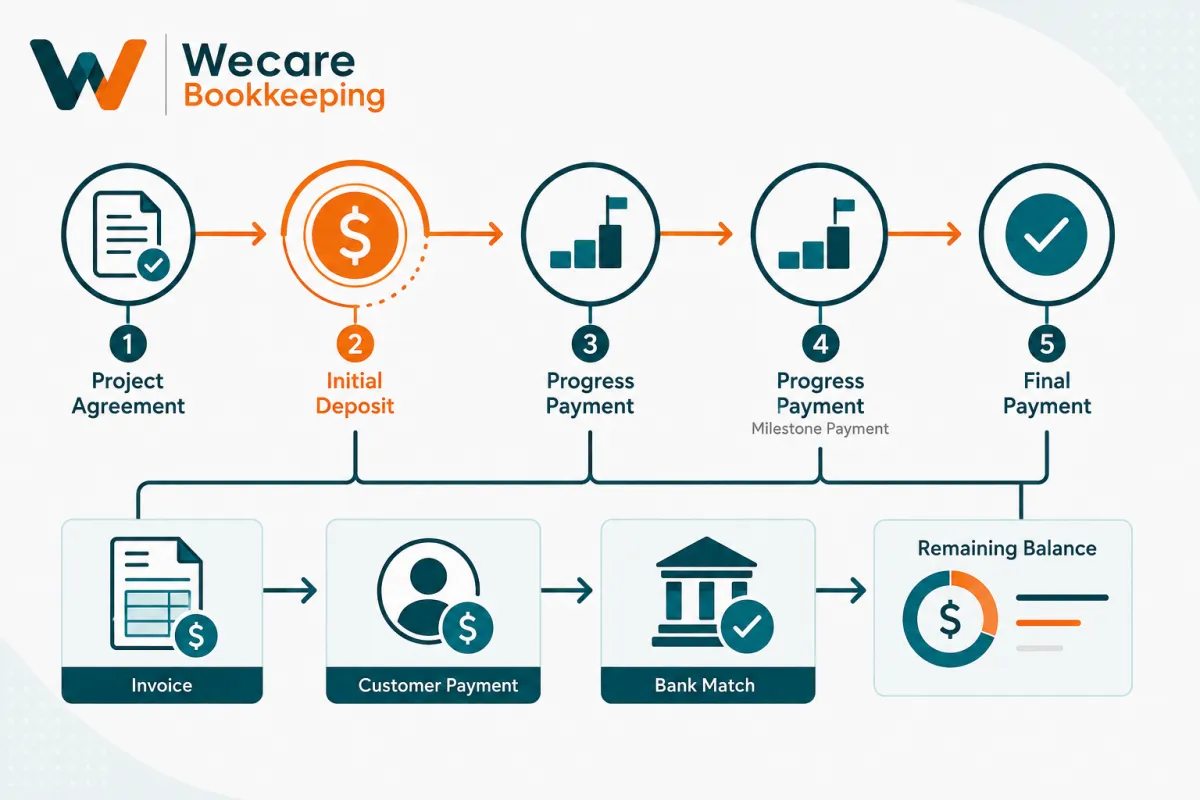
Customer deposit:
20% when the project is approved.
Progress payment:
30% when Phase 1 is completed.
Progress payment:
30% when Phase 2 is completed.
Final payment:
20% when the project is completed.
The exact agreement can vary widely. Some businesses use fixed milestones. Others invoice monthly. Some use percentage-complete billing. Others collect an upfront deposit followed by one final invoice.
The important bookkeeping principle is that the QuickBooks workflow should reflect the actual billing arrangement rather than forcing every project into the same structure.
Why Customer Deposits and Progress Payments Become Messy in QuickBooks
Most problems do not come from one complicated transaction. They come from several reasonable actions being recorded without considering how they connect.
The same payment gets recorded twice
A customer payment is recorded against an invoice.
A few days later, the deposit appears in the bank feed.
If the downloaded transaction is added as new income instead of matched to the payment already recorded in QuickBooks, the same economic activity may be recorded twice.
QuickBooks specifically distinguishes between matching a downloaded bank transaction to an existing QuickBooks record and categorizing it as a new transaction. Intuit recommends matching when the record already exists, which helps prevent duplicate entries.
The payment is not connected to the customer
A bank deposit may be categorized directly without being connected to the customer invoice or payment workflow.
Cash may look correct at the bank level, but the customer's open balance can remain wrong.
You then have one part of QuickBooks saying the money arrived and another part saying the customer still owes it.
A deposit gets confused with a progress invoice
An upfront customer deposit and an invoice for completed project work are not automatically the same event.
If they are treated interchangeably without a defined process, it becomes difficult to see:
What was collected in advance
What has actually been invoiced
What portion of the project remains unbilled
What the customer still owes
Payments are applied to the wrong invoice
Customers with several projects or multiple open invoices require particular attention.
A payment for Project A should not quietly reduce the balance for Project B simply because both belong to the same customer.
Project reporting and cash collection get mixed together
A large deposit can make the bank balance look strong even when very little project work has been completed.
Conversely, substantial work may have been completed while customer payments are still outstanding.
Cash collected and project performance answer different questions.
Good bookkeeping should let you see both.
A Simple Contractor Example
Assume a contractor agrees to a project price of $30,000.
The billing arrangement is:
$6,000 initial deposit
$9,000 after the first milestone
$9,000 after the second milestone
$6,000 upon completion
The total is still $30,000.
But throughout the project, the business needs visibility into several different numbers.
Total project amount
$30,000
This is the overall agreed project amount before any approved changes.
Amount billed
This represents how much has been invoiced to the customer at a particular point.
Amount collected
This represents how much cash has actually been received.
Amount outstanding
This represents invoiced amounts that have not yet been paid.
Remaining project billing
This represents the portion of the agreed project amount that has not yet been invoiced.
These numbers are related, but they are not interchangeable.
That distinction becomes especially important when a business is also using QuickBooks job costing for contractors to compare project revenue with labor, materials, subcontractors, and other direct costs.
How to Structure the Workflow
The best QuickBooks setup starts before the first payment arrives.
Step 1: Define the Billing Arrangement
Start with the commercial agreement.
Identify:
Total project amount
Initial deposit requirement
Billing milestones
Percentage or fixed amount billed at each stage
Payment terms
Final payment requirement
How approved change orders will be handled
QuickBooks should support this process, not define it.
If the project agreement says 20% upfront, 30% at one milestone, 30% at another, and 20% at completion, the bookkeeping workflow should preserve that structure.
Step 2: Keep the Customer and Project Consistent
Use consistent customer and project identification throughout the workflow.
This becomes particularly important when one customer has multiple projects.
Invoices, payments, expenses, and other project activity should be assigned consistently so that project-level reports remain useful.
A payment that cannot be tied back to the correct customer or project creates unnecessary investigation later.
Step 3: Record the Initial Customer Deposit Using the Appropriate Workflow
When money is received before the related services have been performed, do not automatically assume that the only step is to categorize the bank deposit as sales income.
Intuit documents a specific retainer/deposit workflow for money received before services are performed, including tracking the amount and later applying it through the invoicing process.
The appropriate accounting treatment can depend on the nature of the agreement and the business’s circumstances. When that treatment is uncertain, confirm it with the business’s accountant or outside tax professional.
The bookkeeping objective is to preserve a clear trail showing:
customer → deposit received → later billing → application of deposit → remaining balance
Step 4: Create Progress Invoices Consistently
For businesses using estimates and progress billing, QuickBooks Online currently allows an estimate to be converted into multiple invoices over the life of the project.
Instead of invoicing the full estimate at once, portions of the estimate can be invoiced as work progresses. QuickBooks keeps the progress invoices connected to the original estimate.
For our $30,000 example, the billing progression might eventually show:
Original estimate: $30,000
First progress billing: $9,000
Second progress billing: $9,000
Final billing: remaining amount according to the agreed workflow
The exact structure will depend on how the initial deposit is being handled and the accounting treatment selected for the business.
Consistency matters more than complexity.
Step 5: Apply Customer Payments to the Correct Activity
When the customer pays an invoice, record the payment against the appropriate invoice rather than creating an unrelated income transaction.
This allows QuickBooks to update the customer balance.
A useful control question is:
After recording this payment, does the customer's outstanding balance make sense?
If not, investigate before moving on.
Step 6: Match the Bank Activity
After the customer payment reaches the bank, the deposit may appear in QuickBooks through the connected bank feed.
At this point, ask:
Has this payment already been recorded in QuickBooks?
If yes, the downloaded bank transaction generally needs to be matched to the existing record rather than added as another new transaction. Intuit specifically describes matching as the process of linking downloaded bank activity to records already entered in QuickBooks to help avoid duplicates.
This is one of the most important controls in the workflow.
Step 7: Review the Remaining Customer and Project Balances
Do not stop after the bank transaction matches.
Review whether QuickBooks now clearly shows:
What has been invoiced
What has been paid
What remains outstanding
What remains to be billed
Which project the activity belongs to
For businesses using QuickBooks progress invoicing, Intuit also provides an Estimates & Progress Invoicing Summary by Customer report that can be used to review estimates and their connected progress invoices.
Avoid Duplicating Revenue Through the Bank Feed
This issue deserves special attention because it is easy to create and difficult to notice.
Imagine the following sequence.
You send a $9,000 invoice.
The customer pays $9,000.
You record the payment in QuickBooks.
The $9,000 reaches the bank.
QuickBooks downloads a $9,000 bank transaction.
At this point, the bookkeeping already contains the customer payment.
If the bank-feed transaction is then categorized as another $9,000 of income instead of being matched appropriately, you may have duplicated the activity.
The correct conceptual workflow is:
Invoice → Customer Payment → Bank Deposit → Bank-Feed Match
Not:
Invoice → Customer Payment → New Income Transaction
Intuit’s current bank-transaction guidance explicitly separates matching existing records from categorizing downloaded activity as new transactions.
This principle also matters when multiple customer payments are grouped into one bank deposit. QuickBooks provides a bank-deposit workflow for combining customer payments so the QuickBooks deposit can correspond to the amount that actually appears on the bank statement.
How Progress Payments Affect Project Reporting
Billing and project profitability should be connected, but they should not be confused.
Suppose the contractor has collected $15,000 on the $30,000 project.
That tells you something about cash collection.
It does not tell you whether the project is profitable.
To understand project performance, the business also needs visibility into costs such as:
Direct labor
Materials
Subcontractors
Equipment
Other direct project expenses
This is why a structured billing workflow should work alongside a structured job-costing process in QuickBooks Online.
For example, a project might show:
Project amount: $30,000
Customer payments collected: $15,000
Direct project costs recorded so far: $13,500
The fact that $15,000 has been collected does not mean the project has generated $15,000 of profit.
Likewise, the fact that only half the customer payment has been collected does not necessarily mean only half the project work has been completed.
Billing, cash collection, job costs, and profitability each answer a different management question.
Common Mistakes to Avoid
1. Treating every bank deposit as new revenue
A bank deposit may represent a customer payment that has already been recorded elsewhere in QuickBooks.
Check for an existing transaction before categorizing downloaded activity as something new.
2. Recording the same customer payment twice
This can happen when a payment is recorded manually and then added again through the bank feed.
Use matching when appropriate.
3. Mixing payments between projects
If one customer has several active projects, maintain project-level consistency.
4. Leaving payments unapplied
Cash may have been received while the related invoice remains open.
That makes accounts receivable less useful.
5. Ignoring customer credits or old deposits
Old balances should not remain unresolved simply because they have been there for months.
Investigate what they represent.
6. Ignoring change orders
If the agreed project amount changes, the billing structure and project records should reflect the approved change.
Do not quietly force additional work into the original project amount.
7. Looking only at the bank balance
Bank activity tells you what moved through cash.
It does not by itself tell you what remains to be invoiced, what customers still owe, or whether a project is profitable.
8. Using inconsistent customer or project names
Small naming inconsistencies can fragment reporting and make later cleanup more difficult.
9. Changing old transactions without considering reconciliations
Historical corrections can affect previously reconciled periods and financial reports.
If the existing QuickBooks file already contains significant inconsistencies, a structured QuickBooks cleanup may be appropriate before changing large amounts of historical activity.
Monthly Review Checklist for Deposits and Progress Payments
A good workflow still requires regular review.
At month-end, review the following.
Review open customer invoices
Identify invoices that remain unpaid and determine whether the balances are legitimate.
Review customer deposits and credits
Confirm that amounts being held or applied are connected to the appropriate customer activity.
Review incoming customer payments
Make sure payments have been recorded against the correct invoices or customer balances.
Review bank-feed matches
Confirm that previously recorded customer payments were matched appropriately rather than added again.
Compare project billing with the agreement
Ask:
What was supposed to be invoiced by this stage?
What has actually been invoiced?
Are approved change orders reflected?
Is anything being billed too early or too late?
Investigate unapplied payments
An unapplied amount may indicate that a payment was not connected correctly to an invoice or customer transaction.
Review project profitability separately
Do not use the amount collected from the customer as a substitute for project-profitability reporting.
Review revenue and direct costs according to the business’s established bookkeeping process.
Reconcile the bank account
Customer billing records ultimately need to agree with actual bank activity.
A structured monthly reconciliation helps detect missing, duplicated, or incorrectly matched transactions.
Resolve unusual balances before reports are finalized
Old credits, unexpected negative balances, duplicate payments, or unexplained customer balances should be investigated rather than repeatedly carried forward.
Build the Billing Workflow Before Relying on the Reports
Customer deposits and progress payments are not difficult because each individual transaction is unusual.
They become difficult when the transactions are disconnected.
A business owner may have an estimate in one place, an upfront deposit entered another way, milestone invoices created separately, customer payments sitting unapplied, and bank deposits added independently through the bank feed.
Every individual step may appear reasonable.
Together, they can produce unreliable customer balances and confusing reports.
A better process creates one connected workflow:
Project agreement → Customer deposit → Milestone or progress invoice → Customer payment → Bank match → Remaining balance → Project reporting
That structure gives the business control over the billing process before relying on the resulting reports.
For growing businesses, this is also where bookkeeping moves beyond simple transaction entry. The goal is to create records that explain what happened, what is still outstanding, and how the underlying project is performing.
Wecare Bookkeeping helps growing businesses establish structured QuickBooks Online workflows for billing, project bookkeeping, cleanup, and ongoing financial reporting.
Learn more about my Bookkeeping for Contractors, QuickBooks Services, and Monthly Bookkeeping Services, or schedule a free consultation to discuss your bookkeeping workflow.
Frequently Asked Questions
How do you record a customer deposit in QuickBooks Online?
QuickBooks Online provides a workflow for recording customer retainers or deposits received before services are performed and later applying those amounts as appropriate when customers are invoiced. The exact accounting treatment should reflect the business arrangement and may require guidance from an accountant or outside tax professional.
What is the difference between a deposit and a progress payment?
A customer deposit is commonly collected before substantial work begins. A progress payment is generally collected as the project advances. A progress payment may also be described as a milestone payment when it is tied to completion of a specific project stage.
Should a customer deposit be recorded as income?
Do not assume that every upfront customer deposit should automatically be recorded as immediate income. Intuit’s documented retainer/deposit workflow treats certain amounts received before services are performed separately until they are applied. The appropriate accounting treatment depends on the business’s circumstances, so confirm uncertain situations with the business’s accountant or outside tax professional.
Can QuickBooks Online track progress payments?
Yes. QuickBooks Online currently supports progress invoicing, allowing an estimate to be split into multiple invoices over time. The invoices remain connected to the original estimate, allowing the business to review how much has been invoiced as the project progresses.
How do you avoid recording a customer payment twice?
Before categorizing a downloaded bank transaction as new activity, check whether the customer payment has already been recorded. If an existing QuickBooks transaction represents the bank activity, use the matching workflow when appropriate rather than creating another transaction.
Should a bank-feed deposit be added or matched?
If the transaction has already been recorded in QuickBooks, such as through an invoice payment or another existing record, it should generally be matched to the existing transaction rather than added as a new one. If no existing record represents the transaction, it may need to be categorized or otherwise recorded appropriately.
How do customer deposits affect accounts receivable?
That depends on how the deposit and subsequent invoice are structured. The important bookkeeping control is ensuring that amounts are applied to the correct customer activity so that open invoices, payments, credits, and remaining balances remain understandable.
Can I track progress payments by project?
QuickBooks progress invoicing links invoices to the original estimate, while project tracking can provide additional visibility into project activity. The specific setup should be consistent so customer billing and project reporting do not become disconnected. Intuit currently provides progress-invoicing reports for reviewing estimates and connected invoices.
What happens if a customer pays only part of an invoice?
That is generally referred to as a partial payment. The payment should be recorded against the relevant customer invoice so the unpaid portion remains visible as an outstanding balance rather than treating the partial payment as an unrelated transaction.
What happens if a customer pays more than the invoice amount?
First verify why the overpayment occurred. It may represent an error, an amount intended for future work, or another arrangement with the customer. Do not simply force the difference into income to clear the customer balance. The appropriate treatment should reflect the actual circumstances.
Is a milestone payment the same as a progress payment?
Often they describe similar billing arrangements, but “milestone payment” is more specific. It usually means payment becomes due when a defined project stage is reached. “Progress payment” is the broader term for billing or collecting portions of a project amount as work progresses.
How often should customer deposits and progress payments be reviewed?
They should be incorporated into the regular monthly bookkeeping process. At minimum, review open invoices, customer payments, unapplied amounts, deposits, bank-feed matches, project billing, and reconciliations before relying on the month’s financial reports.