
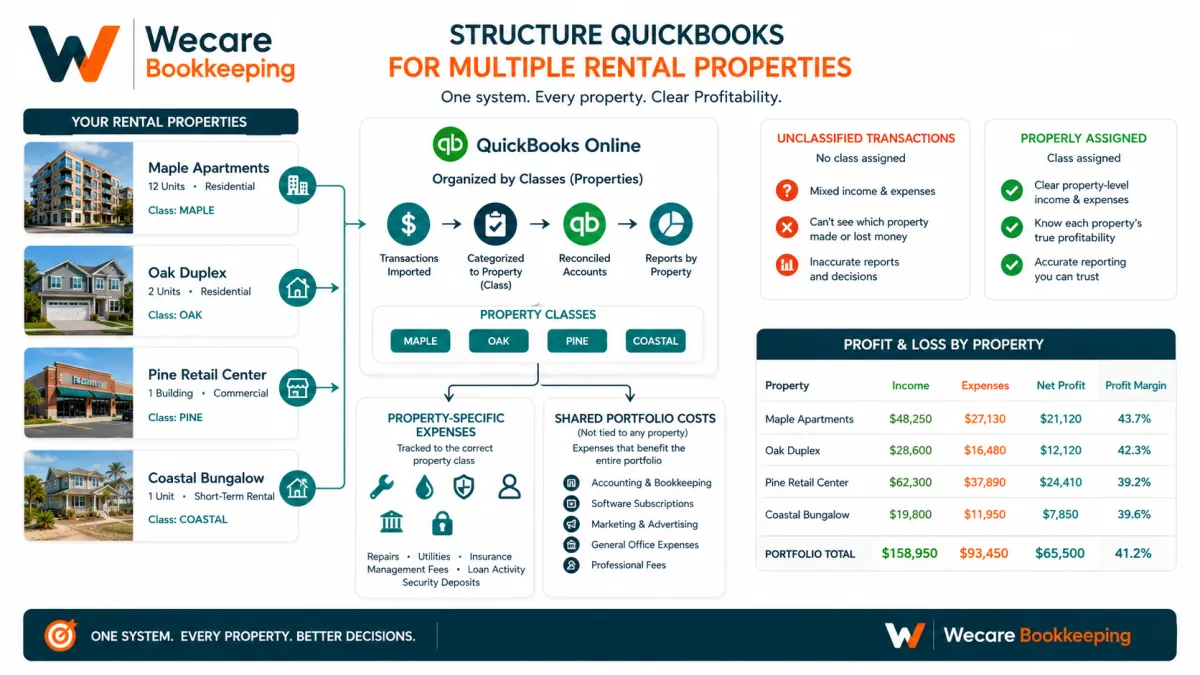
How to Structure QuickBooks for Multiple Rental Properties?
Owning more than one rental property creates a bookkeeping challenge that does not exist when everything belongs to a single building.
It is no longer enough to know whether the overall rental business produced income. You also need to understand what happened at each property.
Which property collected the most rent?
Which building required the most repairs?
Are insurance, utilities, management fees, and loan activity assigned to the correct property?
Can you produce a Profit and Loss statement for one property without rebuilding the numbers in a spreadsheet?
QuickBooks Online can support property-level bookkeeping, but only when the file is structured intentionally. A system that works for one property may become confusing as additional buildings, units, loans, bank accounts, and vendors are added.
The objective is not to create the most complicated chart of accounts possible. It is to build a consistent structure that keeps the books understandable while allowing the owner to review both the full portfolio and individual properties.
Start With the Reporting You Need
Before creating accounts, classes, locations, or projects, decide what information you expect QuickBooks to produce.
A real estate investor may need to review:
Income and expenses by property
Overall portfolio profitability
Rent collected by property
Repairs and maintenance by building
Property management fees
Utilities paid by the owner
Insurance and property-related operating costs
Loan balances and payments
Security deposits held
Amounts due from tenants
Cash held in separate bank accounts
Unusual or unsupported property balances
The right QuickBooks structure should support those reports without requiring extensive manual adjustments every month.
Starting with reporting needs also prevents a common mistake: creating too many accounts before deciding how the information will actually be used.
Decide Whether the Properties Belong in One QuickBooks Company
Some investors track several properties inside one QuickBooks company. Others maintain separate QuickBooks companies for different legal entities or ownership structures.
That decision should not be based only on convenience.
Consider:
Whether the properties belong to the same legal entity
Whether they share bank accounts
Whether ownership percentages differ
Whether liabilities need to remain separate
Whether reporting is required by entity
Whether the accountant or tax professional expects separate records
Whether one consolidated view is operationally useful
A bookkeeper can help organize the records, but legal-entity and tax-reporting decisions should be confirmed with the appropriate legal and tax professionals.
When several properties belong to one entity and share an accounting system, one QuickBooks company may provide an efficient portfolio view. The properties can then be separated through classes, locations, customers, or another consistent tracking method.
When properties belong to different entities, combining them in one file may create confusion and make entity-level reporting more difficult.
Use a Consistent Chart of Accounts
The chart of accounts should explain the economic activity of the rental business without creating a separate account for every property and every type of transaction.
A practical structure might include accounts such as:
Rental income
Record recurring rent and other property-related income separately when the distinction is useful.
Examples may include:
Residential rental income
Commercial rental income
Parking income
Laundry income
Late fees
Other tenant income
The exact categories should reflect the business rather than a generic template.
Property operating expenses
Common property expenses may include:
Repairs and maintenance
Property management fees
Utilities
Insurance
Cleaning
Landscaping
Pest control
Security
Homeowners association fees
Legal and professional fees
Licensing and permits
Bank and payment-processing fees
The property itself should generally be identified through the selected tracking method rather than by creating duplicate expense accounts such as Repairs Property A, Repairs Property B, and Repairs Property C.
A simpler chart of accounts combined with property-level tracking usually produces cleaner reports.
Assets and liabilities
Balance-sheet accounts may be needed for:
Property assets
Accumulated depreciation
Security deposits held
Mortgage or loan balances
Escrow balances
Tenant receivables
Prepaid expenses
Owner contributions or distributions
Due-to or due-from accounts
The appropriate accounting treatment may depend on documentation, ownership structure, and guidance from the business’s accountant or tax professional.
Use Classes to Track Each Property
Classes can be used to separate income and expenses by property while keeping one common chart of accounts.
For example, the class list could include:
101 Market Street
225 Lake Avenue
480 Oak Boulevard
Portfolio or shared costs
Each rental-property transaction is then assigned to the appropriate class.
This structure can support a Profit and Loss by Class report showing the income and operating expenses associated with each property.
QuickBooks currently provides class tracking in QuickBooks Online Plus and Advanced. Intuit describes classes as a way to categorize transactions by meaningful business segments and review income, expenses, and profitability by segment.
Why classes often work well for rental properties
Classes can be useful because they:
Separate property activity without duplicating accounts
Support property-level Profit and Loss reporting
Allow shared accounts across the portfolio
Make it easier to compare properties
Preserve an overall portfolio view
Can be applied to both income and expense transactions
The value of the class system depends on consistent use. A transaction without a class may appear in an unclassified column, reducing the reliability of the property-level report.
Classes Versus Locations
QuickBooks also includes location tracking in certain plans.
Classes and locations are both segmentation tools, but they should not be added simply because they are available.
A common approach is:
Use classes for individual properties
Reserve locations for another meaningful dimension, such as an operating region, office, or business division
For a smaller rental portfolio, classes alone may provide all the property-level reporting needed.
Using both classes and locations for the same purpose can create unnecessary duplication. For example, identifying 101 Market Street as both a class and a location may not add meaningful information.
Choose one primary method for property-level tracking and document how it should be used.
Should Each Property Be a Customer or Project?
Customers and Projects can also track activity, but they are designed primarily around customer relationships and specific work.
QuickBooks Projects can group income and costs connected with a customer and help measure project profitability. The feature is currently available in QuickBooks Online Plus and Advanced.
That structure may be useful for:
Renovation projects
Major property improvements
Tenant build-outs
A specific construction or repair engagement
It is usually less natural for recurring property operations when no traditional customer project exists.
A rental property could technically be created as a customer or project, but that does not automatically make it the best long-term structure. The method should match the reports and workflows the owner needs.
For many rental portfolios:
Classes identify properties
Tenants appear as customers when invoicing is used
Projects may track major renovations or discrete property initiatives
Record Rental Income Consistently
Rental income should be recorded in a way that preserves the connection between:
The tenant
The property
The rental period
The payment received
Any outstanding amount
The related bank deposit
Depending on the workflow, the business may use:
Invoices and customer payments
Sales receipts
Deposit summaries
Property-management statements
Third-party rent collection reports
The same income should not be recorded more than once.
For example, if rent is already recorded through invoices and customer payments, categorizing the related bank deposit directly to rental income could duplicate revenue.
The bookkeeping process should connect the recorded tenant activity to the actual bank deposit and property report.
Separate Security Deposits From Rental Income
A refundable security deposit is generally different from rental income.
The bookkeeping system may need a liability account to track amounts held for tenants until the funds are returned, applied, or otherwise resolved under the relevant agreement and applicable rules.
Security deposit records should identify:
The tenant
The property
The amount received
The date received
Any deductions or applications
The amount returned
The remaining balance
The correct legal and accounting treatment may depend on the lease, jurisdiction, and circumstances. A bookkeeper can maintain the records, but legal and tax questions should be directed to qualified professionals.
Track Property Loans Carefully
Mortgage and other property-loan payments often contain more than one component.
A payment may include:
Principal
Interest
Escrow funding
Insurance
Property taxes
Fees
Other adjustments
Recording the entire payment as an expense can distort both the Profit and Loss statement and the loan balance.
The principal portion generally reduces the loan liability rather than appearing as an operating expense. Other components require appropriate supporting documentation and account treatment.
Loan statements, lender reports, closing documents, and escrow analyses should be retained so the recorded balances can be reviewed and reconciled.
Avoid estimating principal, interest, or escrow allocations when reliable lender documentation is available.
Handle Shared Portfolio Costs Deliberately
Some costs relate directly to one property. Others benefit the portfolio as a whole.
Examples of shared costs may include:
General bookkeeping
Portfolio-level software
Administrative services
General legal support
Business insurance
Office expenses
Portfolio management costs
These costs should not be assigned arbitrarily to whichever property has the most cash available.
The owner should establish a documented allocation method when property-level allocation is useful.
Possible allocation drivers may include:
Number of units
Rental revenue
Square footage
Time spent
Direct usage
Another reasonable operational measure
The method should be applied consistently and reviewed periodically.
Some shared costs may remain in a portfolio or unallocated class when that provides a clearer and more supportable presentation.
Reconcile Every Relevant Account
Property-level reporting is only as reliable as the underlying reconciliations.
Depending on the structure, monthly reconciliation may include:
Operating bank accounts
Security deposit accounts
Credit cards
Loan balances
Escrow balances
Tenant receivables
Property-management clearing accounts
Online payment processors
A reconciled bank account does not automatically mean every property transaction is correctly classified.
The monthly review should also confirm:
Each transaction has the correct property class
Duplicate income has not been recorded
Transfers are not categorized as income or expense
Loan activity is supported
Security deposits are separated from income
Property-management statements agree with recorded activity
Uncategorized and unclassified balances are investigated
Review Property-Level Reports Every Month
Once the system is structured correctly, monthly reports should help the owner move beyond simply checking the bank balance.
Useful reports may include:
Profit and Loss by Class
Balance Sheet
Accounts Receivable Aging
Transaction Detail by Account
Class-based expense reports
Loan balance schedules
Security deposit schedules
Property-management reconciliation reports
The owner should review both the portfolio total and the individual property results.
Property-level reports can help identify:
Rising repairs
Incomplete rent collection
Unexpected utility costs
Misclassified transactions
Unsupported shared expenses
Changes in operating performance
Properties requiring additional investigation
The objective is not simply to produce more reports. It is to produce information that supports clearer decisions.
Common QuickBooks Setup Mistakes
Creating separate accounts for every property expense
A chart of accounts with dozens of nearly identical property-specific accounts becomes difficult to maintain. Classes can often provide property separation while preserving a cleaner account structure.
Using classes inconsistently
Property reports become incomplete when some transactions have classes and others do not.
Combining different legal entities without review
Convenience should not override entity-level reporting requirements or ownership distinctions.
Recording every loan payment as an expense
This can overstate expenses and leave the loan balance inaccurate.
Recording refundable deposits as income
This may distort rental income and fail to preserve the amount owed to tenants.
Duplicating rent through invoices and bank deposits
When the income has already been recorded, the deposit should complete the payment workflow rather than create additional revenue.
Ignoring shared costs
Portfolio expenses need a documented treatment rather than inconsistent or arbitrary property assignments.
Treating repairs and improvements as interchangeable
The appropriate classification may require review by the business’s accountant or tax professional. The bookkeeping records should preserve supporting documents and clear descriptions.
A Practical Monthly Workflow
A structured monthly process might include:
Import or enter all bank, credit-card, rent, loan, and property-management activity.
Match deposits to recorded rental income.
Assign the correct property class to each transaction.
Separate transfers, owner activity, loan principal, interest, fees, and escrow activity.
Review tenant balances and security deposits.
Reconcile bank, credit-card, loan, and clearing accounts.
Review unclassified and uncategorized transactions.
Compare property-management statements with QuickBooks.
Run a Profit and Loss by Class.
Review unusual property-level changes before closing the month.
Consistency matters more than adding every possible QuickBooks feature.
A clear monthly process helps ensure that each property report is supported by reconciled transactions and appropriate documentation.
Build Property-Level Visibility Before Expanding the Portfolio
A growing real estate portfolio requires more than a list of bank transactions.
The bookkeeping system should explain how each property contributes to the overall business, where cash is being used, which balances require attention, and whether the reports are supported by reconciled records.
Wecare Bookkeeping helps real estate investors structure QuickBooks Online, organize property-level activity, reconcile accounts, and maintain clearer monthly financial records.
Learn more about my Bookkeeping for Real Estate Investors, QuickBooks Services, and Monthly Bookkeeping Services, or schedule a free consultation to discuss your current property-bookkeeping workflow.
Frequently Asked Questions
Can QuickBooks track income and expenses by rental property?
Yes. One common method is to create a class for each property and assign the appropriate class to income and expense transactions. This can support property-level Profit and Loss reporting.
Should every property have a separate QuickBooks file?
Not necessarily. The answer depends on legal entities, ownership, bank accounts, reporting requirements, and professional guidance. Several properties owned by one entity may be tracked in one file, while separate entities may require separate records.
Should I use classes or locations for rental properties?
Classes are often suitable for tracking profitability by property. Locations can support another business dimension, but using both for the same purpose may create unnecessary duplication.
Can I track individual units inside each property?
Yes, but the right level of detail depends on the size of the portfolio and the reporting need. Excessive detail can make the system difficult to maintain. Property-level tracking may be sufficient for some owners, while others need unit-level information.
How should security deposits appear in QuickBooks?
Refundable security deposits may need to be tracked separately from rental income, often through a liability account and a supporting tenant schedule. The exact treatment should reflect the agreements, applicable requirements, and professional guidance.